AI coding assistants are prone to using outdated conventions unless you constrain them. When prompting Cursor on modern web projects, the underlying models frequently hallucinate legacy Next.js Pages router methods, litter React components with any types, or write synchronous blocking database queries inside asynchronous Python FastAPI routes.
Cursor rules provide project instructions that can reduce these mistakes; they do not enforce correctness or replace tests. Scoped files in .cursor/rules/ can add the relevant conventions when matching files are in context, depending on the rule's configuration. Cursor rule types and matching behavior.
Model access checked on 22 October 2026: Cursor's current catalog includes Claude Opus 5.5, Sonnet 5.5, Gemini 4 Argon and GPT-5.6 Sol. Availability and billing depend on the account and plan; third-party models are separately billed on current Premium-and-above plans. These rules guide the selected model rather than requiring a particular model version. Cursor models and pricing.
The templates below are starting points for Next.js, React TypeScript and FastAPI. Adapt them to your installed framework versions and verify the resulting code in your own project.
Root .cursorrules vs Modular .cursor/rules/*.mdc
Direct Answer: Cursor supports modular
.cursor/rules/*.mdcfiles. WithalwaysApply: falseand a file pattern, a rule attaches when a matching file is in context. Always-applied, intelligently selected and manually invoked rules behave differently. The legacy.cursorrulesformat is still supported; scoped rules help organize instructions but do not guarantee accurate output.
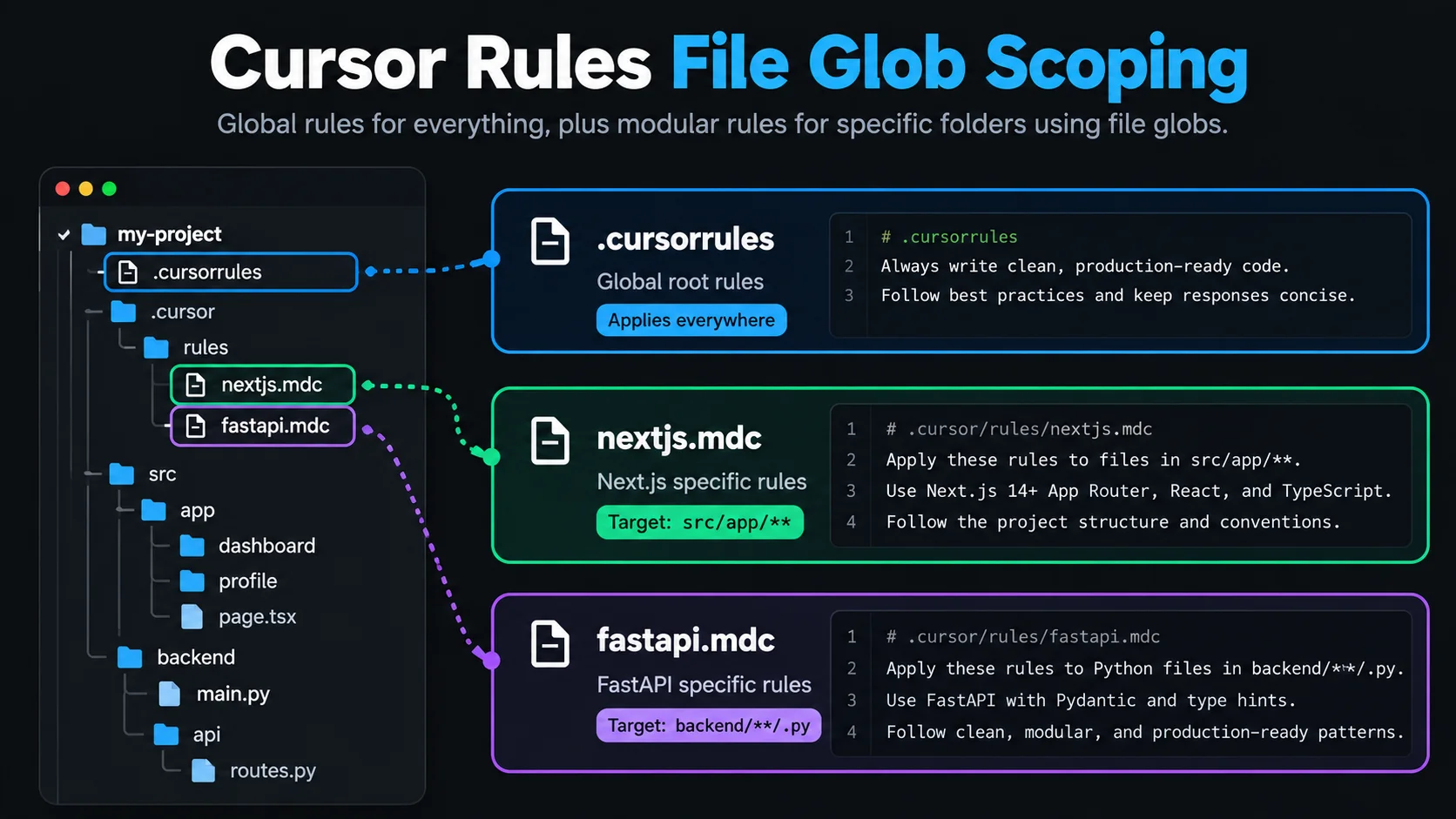
Cursor initially relied on a single .cursorrules file placed in the repository root. While simple, a single file forces every prompt to carry instructions for your entire tech stack, wasting context tokens and creating conflicting advice between frontend and backend code.
Modern Cursor versions support modular rule files inside .cursor/rules/*.mdc. Each .mdc file combines YAML frontmatter with actionable Markdown guidelines:
---
description: Brief description of the rule
globs: pattern/matching/target/files/**
alwaysApply: false
---

# Your technical guidelines here
Key Frontmatter Options
globs: A file matching pattern (such assrc/app/**/*.tsxorbackend/**/*.py). Cursor only injects the rule when you edit or reference matching files.alwaysApply: Set totrueonly for project-wide conventions (such as commit formats or licensing rules). Keep technical framework rules set tofalseso they remain scoped.description: Explains what the rule covers, helping Cursor's semantic router select it during@chat queries.
If you are comparing Cursor's editor-centric rules with terminal-based autonomous agents, read our in-depth comparison of Claude Code vs Cursor.
1. Best Cursor Rules for Next.js (App Router)
Save this file as .cursor/rules/nextjs.mdc. It enforces Next.js App Router patterns, prevents accidental client-side data leaks, and standardizes Server Component data fetching.
---
description: Next.js App Router and Server Component Standards
globs: src/app/**/*.{ts,tsx},app/**/*.{ts,tsx}
alwaysApply: false
---

# Next.js Architecture Rules

## Server and Client Component Boundaries
- Default to React Server Components (RSC). Do not add "use client" unless the component requires useState, useEffect, browser event handlers, or browser-only APIs.
- Keep Client Components at the leaves of the render tree. Pass data down from Server Components as serializable props.
- Never import server-only libraries (database clients, private environment secrets) into Client Components.

## Data Fetching and Mutations
- Fetch data directly inside Server Components using async/await. Avoid useEffect data fetching.
- Use Next.js Server Actions for form submissions and state mutations. Colocate actions or place them in `actions.ts` with "use server" at the top of the file.
- Validate all Server Action inputs using Zod schemas before performing database queries.
- Revalidate cached routes using `revalidatePath()` or `revalidateTag()` immediately following a successful mutation.

## Navigation and Routing
- Use `next/link` for internal navigation; never use native `<a href>` tags for local links.
- Read search parameters via page props or `useSearchParams()`. Handle suspense boundaries around components reading query parameters to avoid opting entire pages into client-side rendering.
2. Best Cursor Rules for React and TypeScript
Save this file as .cursor/rules/react-typescript.mdc. It stops Cursor from writing weak types, enforces named component exports, and guarantees consistent UI patterns.
---
description: React and TypeScript Coding Standards
globs: **/*.{ts,tsx}
alwaysApply: false
---

# React and TypeScript Guidelines

## TypeScript Strictness
- Never use the `any` type. Use `unknown` for arbitrary inputs and narrow with type guards.
- Prefer `interface` for object shapes and component props. Use `type` for unions, intersections, and mapped types.
- Ensure all function signatures declare explicit return types when exporting across module boundaries.
- Avoid non-null assertions (`!`). Handle undefined and null cases explicitly with optional chaining (`?.`) or fallback defaults.

## Component Architecture
- Use named exports exclusively: `export function UserProfile(...)`. Avoid `export default`.
- Define prop interfaces directly above the component definition using the format `<ComponentName>Props`.
- Destructure props in the function signature: `function Button({ variant = "primary", children }: ButtonProps)`.
- Extract complex component logic into dedicated custom hooks prefixed with `use` (e.g. `useDebounce`, `useLocalStorage`).

## Styling and DOM
- Use Tailwind CSS utility classes directly. Avoid inline `style={{ ... }}` objects.
- Group conditional classes using the `cn()` helper (clsx + tailwind-merge).
- Ensure all interactive elements include accessible labels (`aria-label`, `aria-describedby`) and keyboard accessibility.
3. Best Cursor Rules for Python and FastAPI
Save this file as .cursor/rules/fastapi.mdc. It enforces asynchronous non-blocking patterns, Pydantic v2 schemas, and dependency injection best practices.
---
description: Python FastAPI and Pydantic Standards
globs: **/*.py,backend/**/*.py,api/**/*.py
alwaysApply: false
---

# FastAPI Development Rules

## Async Route Handlers
- All endpoint handlers performing I/O must be defined with `async def`.
- Never use blocking synchronous operations (such as `requests.get()`, `time.sleep()`, or synchronous database drivers) inside async routes.
- Use `httpx.AsyncClient` for outbound HTTP requests and async database drivers (such as `asyncpg` or `aiomysql`).

## Pydantic v2 Models
- Separate request payloads, response models, and database representations into distinct Pydantic models.
- Suffix schema names clearly: `UserCreateRequest`, `UserUpdatePayload`, `UserResponse`.
- Always set `from_attributes = True` inside `model_config` when reading data from ORM objects.
- Use Field() with explicit constraints (`min_length`, `gt`, `le`) and descriptive examples.

## Dependency Injection and Security
- Inject database sessions and authentication contexts using FastAPI's `Depends()` pattern.
- Wrap database operations in async context managers to guarantee session cleanup on failure.
- Raise `HTTPException` with explicit HTTP status codes (`status.HTTP_404_NOT_FOUND`, `status.HTTP_400_BAD_REQUEST`) rather than returning raw error dictionaries.
Harmonizing Cursor Rules with Terminal Agents
If your team also uses Claude Code for terminal-based refactoring or test automation, you should keep your repository rules aligned. While Cursor reads .cursor/rules/*.mdc, Claude Code reads CLAUDE.md and modular skill packages.
You can learn how to set up automated testing and review workflows in our guide to the best Claude Code skills for developers, or browse our catalog of verified engineering skills.
How to Test and Verify Your Cursor Rules
Once your .cursor/rules/ files are saved, verify that Cursor loads them properly:
Verify glob matching: Open a file matching a rule's glob pattern (e.g.
src/app/page.tsx).Open Cursor Chat (
Cmd+L): Look at the active context pill at the bottom of the chat pane. You should seenextjs.mdclisted under active project rules.Explicitly mention a rule: If you want to force a rule into context regardless of the current active file, type
@in chat, select Rules, and pick your target rule file.Test in Composer (
Cmd+I): Ask Cursor to create a new component or route handler. Check the generated diff to confirm it adhered to the declared rules (such as named exports and strict typing).
Four Mistakes to Avoid When Writing Cursor Rules
To keep Cursor fast, accurate, and within token limits, avoid these common traps:
Rule Bloat: Do not paste your entire company coding handbook into a single file. Keep each
.mdcfile under 80 lines and focus on concrete, actionable dos and don'ts.Missing Globs: If you omit
globs, the rule will not attach automatically when browsing your codebase. Always provide targeted patterns.Contradictory Instructions: If your root
.cursorrulessays "use Axios" while your modular rule says "use Fetch", Cursor will alternate between both unpredictably. Centralize network and styling choices.Vague Philosophies: Replace subjective statements like "Write clean code" with verifiable instructions like "Never nest ternaries beyond one level" or "Limit functions to 40 lines".
Summary Checklist
Framework | Rule File Location | Primary Enforcements |
|---|---|---|
Next.js |
| Server Components, Server Actions, route caching, Zod validation |
React & TS |
| Strict typing without |
FastAPI |
| Async non-blocking endpoints, Pydantic v2 schemas, |
Agent Skills |
| Explore the Thrive Skills Directory |
By configuring modular .cursor/rules/*.mdc files, you turn Cursor from a generic autocomplete engine into a specialized pair programmer calibrated to your team's exact production architecture.