Developers evaluating modern AI coding tools face a clear architectural choice: do you want an autonomous agent running inside your terminal, or an AI-native editor wrapped around your code?
Claude Code and Cursor support both interactive and agentic work. Claude Code can inspect files, run commands and edit a repository from the terminal, IDE extensions, desktop app or browser. Cursor combines a VS Code-based editor and Tab completion with an Agent that can also edit files and run terminal commands. The comparison below focuses on a terminal-led Claude Code workflow and an editor-led Cursor workflow, rather than treating either tool as limited to one mode. Claude Code overview, Cursor Agent.
Model access, prices and published benchmark results were checked on 22 October 2026. Subscription allowances, API billing and model performance are different parts of the decision.
Quick Verdict: Which Tool Wins Where
Direct Answer: Choose Claude Code for a terminal-led workflow with repository search, command execution and multi-file changes. Choose Cursor when an integrated editor, Tab completion and visual review suit your work. Both offer agents; compare model access, usage limits and additional charges before choosing a subscription.
Choose Claude Code if: You spend most of your day in the terminal (Bash, Zsh, Tmux), need an agent that executes test suites and self-corrects runtime errors before prompting for review, require direct git operations, or develop in remote headless environments via SSH.
Choose Cursor if: You prefer editing and reviewing changes in one desktop workspace and use Tab completion alongside Agent. A monthly subscription does not make third-party model usage unlimited or remove its separate charges.
The professional hybrid workflow: Many senior engineering teams use Cursor as their primary editor for day-to-day coding, while running Claude Code in Cursor's integrated terminal to execute large-scale refactors, test fixes, and automated code reviews.
Core Architectural Differences
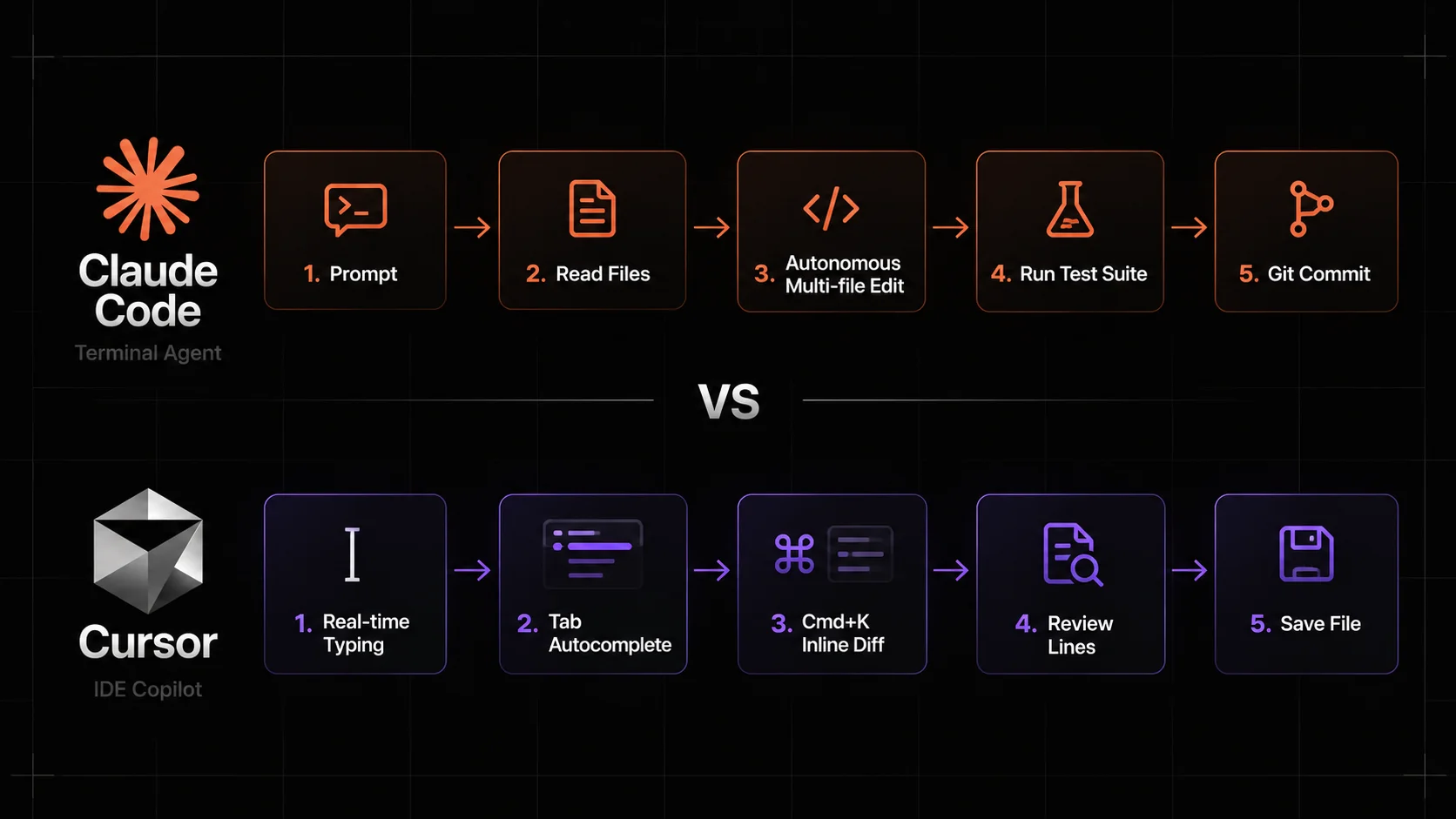
The fundamental difference between Claude Code and Cursor is where the model sits in your engineering loop.
Feature | Claude Code | Cursor |
|---|---|---|
Primary Interface | Terminal, IDE extensions, desktop and web | Editor with Agent, plus CLI and cloud workflows |
Core Philosophy | Agentic repository work across supported surfaces | Editor assistance and agentic work |
Autocomplete | None (Command-line prompted) | Real-time inline Tab completion |
Command Execution | Native shell execution with permission prompts | Terminal integration (manual or agent-prompted) |
Multi-file Edits | Agent edits with review and permission controls | Agent edits with visual review |
Context Engine | Git grep, file reads, and MCP servers | Local vector embeddings and |
Model Access | Claude models including Opus 5.5 and Sonnet 5.5; provider and account restrictions apply | Supported models include Opus 5.5, Sonnet 5.5, Gemini 4 Argon and GPT-5.6 Sol; plan restrictions apply |
Billing Model | Eligible Claude subscription or separately billed API/provider usage | Current subscription plans plus separate third-party model charges; eligible legacy plans differ |
Claude Code: The Autonomous Terminal Agent
Claude Code runs as a command-line application (@anthropic-ai/claude-code). Once launched in a repository directory, it acts as an autonomous pair programmer.
You provide a high-level goal, such as resolving an intermittent test failure, optimizing a slow SQL query, or migrating an API route. Instead of waiting for you to copy and paste code back and forth, Claude Code reads the relevant files, executes the test suite to observe the failure, applies code modifications, re-runs the tests to verify the fix, and formats a clean git commit.
Key characteristics:
Tool execution: Can run shell commands, grep, file searches, and git commands directly in your local environment.
Autonomous agent loop: Continues working until your test suite passes or it reaches a declared stopping condition.
Safety controls: Explicitly requests confirmation before executing potentially destructive bash commands.
Cursor: The AI-First Code Editor
Cursor is built directly on the VS Code codebase, meaning all of your existing extensions, keybindings, and themes carry over seamlessly.
Cursor combines multi-line Tab completion and inline editing with Agent (Cmd+I on macOS or Ctrl+I on Windows/Linux). Agent can search files, make multi-file edits and run terminal commands. You can review its changes in the editor; manual copy-and-apply chat is an option, not the extent of Cursor's capabilities. Cursor Agent tools.
Key characteristics:
Interactive speed: Near-instant suggestions while you write.
Visual diff inspection: Accept or reject individual line changes with keyboard shortcuts.
Codebase indexing: Builds a local vector index of your repository for natural language questions.
Context Management: How Each Tool Reads Your Code
AI assistants are only as good as the context they ingest. Claude Code and Cursor approach context retrieval differently.
Cursor Semantic Indexing
Cursor indexes your entire repository locally using vector embeddings. When you ask a question using @codebase, Cursor searches for semantically similar functions, classes, and documentation. You can also explicitly target context using symbols:
@Filesto attach specific files to your prompt.@Foldersto attach entire directory trees.@Docsto pull in third-party library documentation.
This approach works exceptionally well for large repositories where you need the AI to locate relevant files without knowing their exact names.
Claude Code Search and MCP Tools
Claude Code does not maintain a static vector database. Instead, it behaves like an experienced developer sitting at a terminal. It uses standard command-line tools to discover context dynamically:
Inspects
git statusand git history.Executes
grepand file listing commands to find references.Connects to Model Context Protocol (MCP) servers to query external databases, issue trackers, and internal APIs.
Claude Code's current model configuration gives Opus 5.5 a native 1 million-token context window, subject to configuration and provider limits. Cursor lists 300k context and a 1M maximum for its Opus 5.5 integration. These are different product configurations of the same model; neither means that every repository is loaded or that errors disappear. Check the selected model and settings in your account. Claude Code context configuration, Opus 5.5 in Cursor.
Current Coding Benchmarks: Results and Test Conditions
The following results are from the publishers' evaluations, checked on 22 October 2026. We did not run an independent head-to-head test of Claude Code and Cursor.
CursorBench 4.0
Cursor evaluates agents on ambiguous, multi-file tasks drawn from real Cursor sessions. Its current leaderboard reports these configurations in the same benchmark version:
Model | Reasoning effort | CursorBench 4.0 score |
|---|---|---|
Claude Opus 5.5 | Max | 57.8% |
Claude Opus 5.5 | High | 56.0% |
Claude Sonnet 5.5 | Max | 55.5% |
Gemini 4 Argon | High | 52.9% |
GPT-5.6 Sol | Max | 41.7% |
Source: Cursor's live CursorBench 4.0 leaderboard. These are model-and-effort configurations evaluated by Cursor in its agent environment, not scores for Claude Code versus the Cursor application. Different effort levels spend different amounts of computation; scores from other CursorBench versions or SWE-bench are not interchangeable.
Terminal-Bench 4.0
Anthropic reports 66.4% for Opus 5.5 at xhigh effort, with a standard error of ±2.6 percentage points, on Terminal-Bench 4.0. Its evaluation retained production safeguards: when triggered, cybersecurity tasks fell back to Opus 4.8, and biology or frontier-model-development tasks to Opus 5. This is a vendor-reported result with those conditions, separate from CursorBench. Anthropic's benchmark table and evaluation notes.
Use the published scores to shortlist configurations, then test the same representative repository tasks, acceptance criteria and spending limits in both products. Record task completion, regressions, review time and total cost before deciding which works better for your team.
Project Instructions: CLAUDE.md vs .cursor/rules
Both tools allow teams to define custom instructions so the AI adheres to project conventions.
Claude Code: CLAUDE.md
Claude Code automatically reads a file named CLAUDE.md in your project root at the start of every session. This file should contain concise, practical guidelines:
# Project Instructions for Claude Code

## Commands
- Run development server: `npm run dev`
- Run test suite: `npm test`
- Typecheck: `npm run typecheck`

## Architecture Rules
- Use Next.js App Router conventions.
- Never use default exports for components; use named exports.
- All database queries must run through Drizzle ORM helpers in `src/lib/db`.
To take Claude Code even further, you can install specialized agent skills that standardize team workflows for testing, code review, and database safety. Learn more in our comprehensive guide to the best Claude Code skills for developers.
Cursor: .cursor/rules
Cursor supports modular rule files located in .cursor/rules/*.mdc. This allows you to apply specific rules only to relevant files using glob patterns:
---
description: Next.js Server Component Guidelines
globs: src/app/**/*.tsx
---

- Always mark interactive components with "use client" at line 1.
- Fetch data in server components and pass down via props.
- Use Tailwind CSS utility classes; avoid inline styles.
For rule templates to adapt and verify in your own stack, see our guide on production-ready Cursor rules for Next.js, React TypeScript, and FastAPI.
Pricing and Cost Comparison
Prices below were checked on 22 October 2026 and are in USD before applicable taxes. Monthly subscription prices and API token rates measure different things. Included allowances, extra usage and the selected model determine the bill.
Cursor Pricing: Current and Legacy Plans
New customers use The X Subscription, which shares an included weekly usage pool across Cursor and Grok. The listed individual monthly prices are:
Plan | Monthly price | Third-party models such as Claude |
|---|---|---|
Free | $0 | Not available |
Plus | $8 | Not available; Grok models only |
Premium | $30 | Separately billed from prepaid credit at API list prices |
Super | $100 | Separately billed from prepaid credit at API list prices |
Ultra | $200 | Separately billed from prepaid credit at API list prices |
The included usage pool is not an unlimited allowance for Claude, OpenAI or Gemini models. Annual subscriptions have different billing totals. Cursor's current plans and billing details.
Existing eligible accounts may retain legacy plans, including Pro at $20/month, Pro+ at $60/month, Ultra at $200/month, and Teams Standard at $40 per user/month. Their allowances differ from new plans; do not assume the old “500 fast requests” description applies. Switching to the new subscription is optional and permanent under the documented policy. Legacy Cursor plans.
Claude Code Pricing: Subscription or API
Claude Code is included with eligible paid Claude plans, subject to usage limits. Pro costs $20/month when billed monthly, or $200 billed annually; Max starts at $100/month. It is not an API-only product. API/Console or cloud-provider authentication uses separate usage billing, so confirm which account is active before running a long task. Claude subscription pricing, Claude Code cost controls.
For direct Anthropic API usage, the standard rates currently listed for two common coding models are:
Model | Input / 1M tokens | Output / 1M tokens | 5-minute cache write / 1M tokens | Cache read / 1M tokens |
|---|---|---|---|---|
Claude Opus 5.5 | $4 | $20 | $5 | $0.20 |
Claude Sonnet 5.5 | $2 | $10 | $2.50 | $0.10 |
Source: Anthropic's API pricing table. These are standard API rates, not a conversion of a Claude subscription allowance. Extended cache writes, fast mode and provider-specific charges can differ. Cheaper cache reads do not discount every input or output token, and do not establish a fixed percentage saving on the whole session.
Neither product is always cheaper. Compare the subscription charge, included usage, chosen model, cache behavior, extra spend and review time for your actual tasks. Set spending controls instead of relying on an unsupported “typical daily cost.”
A Worked Example: Debugging an Asynchronous Test Failure
To see the operational differences, consider a common task: fixing an asynchronous race condition in a test suite.
How Claude Code Handles It
You start the session:
claude "The test in tests/auth.test.cjs is intermittently failing. Find why and fix it."Claude Code runs
npm testto observe the failure output.It inspects
tests/auth.test.cjsand the imported modulesrc/lib/auth.ts.It identifies an unawaited promise in the session invalidation helper.
It edits
src/lib/auth.tsto add the missingawait.It re-runs
npm testto verify that all tests pass cleanly.It presents a git diff for your final review and offers to commit the change.
A Manual Cursor Workflow
You open
tests/auth.test.cjsin the editor.You run the test in the terminal and copy the error trace.
You press
Cmd+Lto open Cursor Chat, paste the error, and reference@auth.ts.Cursor explains the race condition and suggests the corrected async function.
You click Apply in the chat window, inspect the inline green/red diff in the editor, and press
Cmd+Enterto accept.You switch back to the terminal and re-run your test command manually.
The Cursor sequence above illustrates manual review through chat. Cursor Agent can also run commands, edit files and iterate on tests, while Claude Code offers visual review through its IDE and desktop surfaces. Configure permissions and review the result whichever workflow you use. Cursor Agent, Claude Code surfaces.
How to Combine Both: The Recommended Hybrid Setup
You do not have to choose one over the other. The most effective developer setup combines their complementary strengths:
Use Cursor as your primary editor: Enjoy instant Tab autocomplete, multi-cursor editing, syntax highlighting, and inline
Cmd+Kadjustments while writing new code.Open Claude Code in Cursor's integrated terminal: When you finish a feature and need to write unit tests, run
claudein the bottom panel. Let Claude Code scan your new files, generate test fixtures, run the test runner, and resolve edge cases autonomously.Keep instructions aligned: Maintain consistent project conventions in
CLAUDE.mdand the appropriate.cursor/rules/*.mdcfiles, while retaining each tool's instruction format.
Summary Checklist
If your priority is... | The better choice is |
|---|---|
Fast inline autocompletion while typing | Cursor |
Running tests with agentic iteration | Both; compare permissions and review workflow |
Visual side-by-side diff review | Cursor |
Remote server or SSH development | Claude Code |
Controlling monthly spending | Either, with an appropriate plan and usage controls |
Extensibility via Model Context Protocol (MCP) | Both support MCP |
Choose the interface and review process you can use reliably. Check the model picker and billing screen, try representative tasks, and compare verified results rather than assuming a benchmark score or monthly subscription guarantees a better outcome.