Versão breve
- O trabalho de UX começa por dificuldades observadas. Estes prompts pedem ao assistente que declare pressupostos, descreva uma tarefa e proponha um teste antes de recomendar alterações na interface.
- Os ecrãs gerados são pontos de partida. Teste-os com conteúdo real, teclado, ecrãs pequenos e as pessoas que os vão utilizar. O acabamento visual não comprova a usabilidade.
O trabalho de UX começa por dificuldades observadas. Estes prompts pedem ao assistente que declare pressupostos, descreva uma tarefa e proponha um teste antes de recomendar alterações na interface.
Os ecrãs gerados são pontos de partida. Teste-os com conteúdo real, teclado, ecrãs pequenos e as pessoas que os vão utilizar. O acabamento visual não comprova a usabilidade.
Como utilizar esta coleção
Escolha a tarefa mais próxima do seu trabalho. Copie o prompt, substitua a cena genérica ou o contexto de código pelos seus dados e mantenha as restrições que ajudam a avaliar o resultado. Altere uma variável de cada vez para identificar o que melhorou.
A abordagem segue o Guia do Figma First Draft: forneça contexto concreto e examine o resultado sem assumir que um primeiro rascunho bem apresentado está correto.
Prompts para descrever a tarefa
Para descrever a tarefa, identifique o utilizador e a decisão que o ecrã deve apoiar.
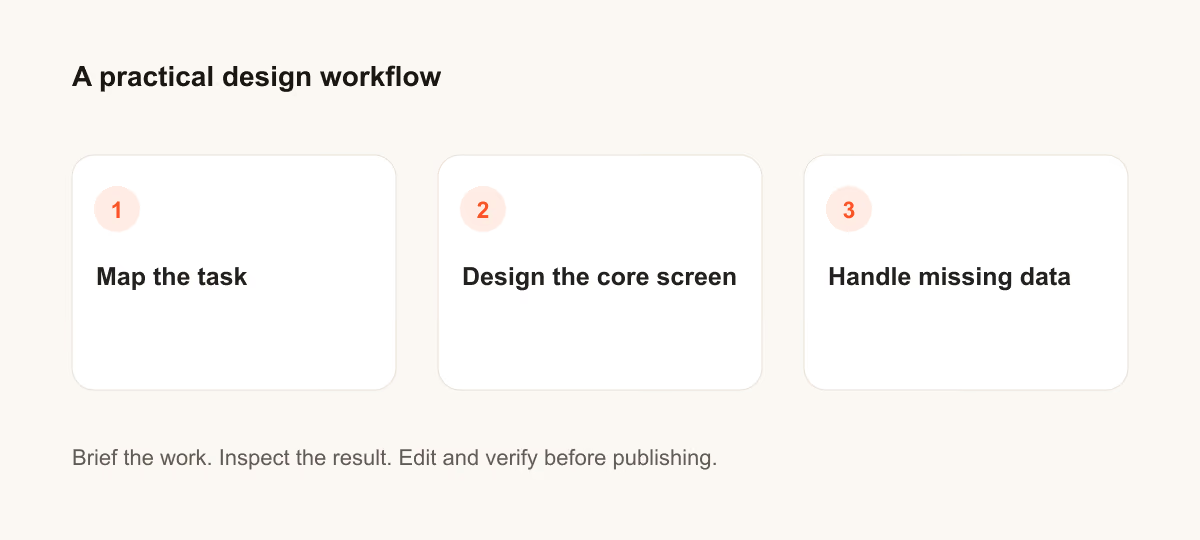
1. Uma recuperação de palavra-passe confusa
Design a confusing password reset for a person who needs to finish one task quickly. State the audience and task you are assuming. Then show the user goal, entry point, essential action and success state in a low-fidelity flow. Use realistic labels and content lengths, with no invented metrics or testimonials. Describe the information hierarchy, mobile adaptation and next action. Explain one tradeoff and how you would check it with users.Verificação: Um novo utilizador consegue identificar a ação seguinte sem ler uma indicação adicional?
2. Um formulário de candidatura longo
Design a long application form for a person who needs to finish one task quickly. State the audience and task you are assuming. Then show the user goal, entry point, essential action and success state in a low-fidelity flow. Use realistic labels and content lengths, with no invented metrics or testimonials. Describe the information hierarchy, mobile adaptation and next action. Explain one tradeoff and how you would check it with users.Verificação: Um novo utilizador consegue identificar a ação seguinte sem ler uma indicação adicional?
3. Um caminho de cancelamento escondido
Design a hidden cancellation path for a person who needs to finish one task quickly. State the audience and task you are assuming. Then show the user goal, entry point, essential action and success state in a low-fidelity flow. Use realistic labels and content lengths, with no invented metrics or testimonials. Describe the information hierarchy, mobile adaptation and next action. Explain one tradeoff and how you would check it with users.Verificação: Um novo utilizador consegue identificar a ação seguinte sem ler uma indicação adicional?
4. Um resultado de pesquisa vazio
Design an empty search result for a person who needs to finish one task quickly. State the audience and task you are assuming. Then show the user goal, entry point, essential action and success state in a low-fidelity flow. Use realistic labels and content lengths, with no invented metrics or testimonials. Describe the information hierarchy, mobile adaptation and next action. Explain one tradeoff and how you would check it with users.Verificação: Um novo utilizador consegue identificar a ação seguinte sem ler uma indicação adicional?
5. Um painel de filtros móvel
Design a mobile filter panel for a person who needs to finish one task quickly. State the audience and task you are assuming. Then show the user goal, entry point, essential action and success state in a low-fidelity flow. Use realistic labels and content lengths, with no invented metrics or testimonials. Describe the information hierarchy, mobile adaptation and next action. Explain one tradeoff and how you would check it with users.Verificação: Um novo utilizador consegue identificar a ação seguinte sem ler uma indicação adicional?
6. Um envio de ficheiros atrasado
Design a delayed upload for a person who needs to finish one task quickly. State the audience and task you are assuming. Then show the user goal, entry point, essential action and success state in a low-fidelity flow. Use realistic labels and content lengths, with no invented metrics or testimonials. Describe the information hierarchy, mobile adaptation and next action. Explain one tradeoff and how you would check it with users.Verificação: Um novo utilizador consegue identificar a ação seguinte sem ler uma indicação adicional?
7. Uma página de definições demasiado densa
Design a dense settings page for a person who needs to finish one task quickly. State the audience and task you are assuming. Then show the user goal, entry point, essential action and success state in a low-fidelity flow. Use realistic labels and content lengths, with no invented metrics or testimonials. Describe the information hierarchy, mobile adaptation and next action. Explain one tradeoff and how you would check it with users.Verificação: Um novo utilizador consegue identificar a ação seguinte sem ler uma indicação adicional?
8. Um seletor de datas inacessível
Design an inaccessible date picker for a person who needs to finish one task quickly. State the audience and task you are assuming. Then show the user goal, entry point, essential action and success state in a low-fidelity flow. Use realistic labels and content lengths, with no invented metrics or testimonials. Describe the information hierarchy, mobile adaptation and next action. Explain one tradeoff and how you would check it with users.Verificação: Um novo utilizador consegue identificar a ação seguinte sem ler uma indicação adicional?
9. Um ecrã de confirmação pouco claro
Design a weak confirmation screen for a person who needs to finish one task quickly. State the audience and task you are assuming. Then show the user goal, entry point, essential action and success state in a low-fidelity flow. Use realistic labels and content lengths, with no invented metrics or testimonials. Describe the information hierarchy, mobile adaptation and next action. Explain one tradeoff and how you would check it with users.Verificação: Um novo utilizador consegue identificar a ação seguinte sem ler uma indicação adicional?

10. Uma passagem inadequada após a integração inicial
Design a poor onboarding handoff for a person who needs to finish one task quickly. State the audience and task you are assuming. Then show the user goal, entry point, essential action and success state in a low-fidelity flow. Use realistic labels and content lengths, with no invented metrics or testimonials. Describe the information hierarchy, mobile adaptation and next action. Explain one tradeoff and how you would check it with users.Verificação: Um novo utilizador consegue identificar a ação seguinte sem ler uma indicação adicional?
Prompts para desenhar o ecrã principal
Para desenhar o ecrã principal, identifique o utilizador e a decisão que o ecrã deve apoiar.
11. Uma recuperação de palavra-passe confusa
Design a confusing password reset for a person who needs to finish one task quickly. State the audience and task you are assuming. Then use a clear hierarchy, realistic content lengths and one prominent primary action. Use realistic labels and content lengths, with no invented metrics or testimonials. Describe the information hierarchy, mobile adaptation and next action. Explain one tradeoff and how you would check it with users.Verificação: Verifique o layout no computador e num ecrã móvel com 360 píxeis de largura.
12. Um formulário de candidatura longo
Design a long application form for a person who needs to finish one task quickly. State the audience and task you are assuming. Then use a clear hierarchy, realistic content lengths and one prominent primary action. Use realistic labels and content lengths, with no invented metrics or testimonials. Describe the information hierarchy, mobile adaptation and next action. Explain one tradeoff and how you would check it with users.Verificação: Verifique o layout no computador e num ecrã móvel com 360 píxeis de largura.
13. Um caminho de cancelamento escondido
Design a hidden cancellation path for a person who needs to finish one task quickly. State the audience and task you are assuming. Then use a clear hierarchy, realistic content lengths and one prominent primary action. Use realistic labels and content lengths, with no invented metrics or testimonials. Describe the information hierarchy, mobile adaptation and next action. Explain one tradeoff and how you would check it with users.Verificação: Verifique o layout no computador e num ecrã móvel com 360 píxeis de largura.
14. Um resultado de pesquisa vazio
Design an empty search result for a person who needs to finish one task quickly. State the audience and task you are assuming. Then use a clear hierarchy, realistic content lengths and one prominent primary action. Use realistic labels and content lengths, with no invented metrics or testimonials. Describe the information hierarchy, mobile adaptation and next action. Explain one tradeoff and how you would check it with users.Verificação: Verifique o layout no computador e num ecrã móvel com 360 píxeis de largura.
15. Um painel de filtros móvel
Design a mobile filter panel for a person who needs to finish one task quickly. State the audience and task you are assuming. Then use a clear hierarchy, realistic content lengths and one prominent primary action. Use realistic labels and content lengths, with no invented metrics or testimonials. Describe the information hierarchy, mobile adaptation and next action. Explain one tradeoff and how you would check it with users.Verificação: Verifique o layout no computador e num ecrã móvel com 360 píxeis de largura.
16. Um envio de ficheiros atrasado
Design a delayed upload for a person who needs to finish one task quickly. State the audience and task you are assuming. Then use a clear hierarchy, realistic content lengths and one prominent primary action. Use realistic labels and content lengths, with no invented metrics or testimonials. Describe the information hierarchy, mobile adaptation and next action. Explain one tradeoff and how you would check it with users.Verificação: Verifique o layout no computador e num ecrã móvel com 360 píxeis de largura.
17. Uma página de definições demasiado densa
Design a dense settings page for a person who needs to finish one task quickly. State the audience and task you are assuming. Then use a clear hierarchy, realistic content lengths and one prominent primary action. Use realistic labels and content lengths, with no invented metrics or testimonials. Describe the information hierarchy, mobile adaptation and next action. Explain one tradeoff and how you would check it with users.Verificação: Verifique o layout no computador e num ecrã móvel com 360 píxeis de largura.
18. Um seletor de datas inacessível
Design an inaccessible date picker for a person who needs to finish one task quickly. State the audience and task you are assuming. Then use a clear hierarchy, realistic content lengths and one prominent primary action. Use realistic labels and content lengths, with no invented metrics or testimonials. Describe the information hierarchy, mobile adaptation and next action. Explain one tradeoff and how you would check it with users.Verificação: Verifique o layout no computador e num ecrã móvel com 360 píxeis de largura.
19. Um ecrã de confirmação pouco claro
Design a weak confirmation screen for a person who needs to finish one task quickly. State the audience and task you are assuming. Then use a clear hierarchy, realistic content lengths and one prominent primary action. Use realistic labels and content lengths, with no invented metrics or testimonials. Describe the information hierarchy, mobile adaptation and next action. Explain one tradeoff and how you would check it with users.Verificação: Verifique o layout no computador e num ecrã móvel com 360 píxeis de largura.
20. Uma passagem inadequada após a integração inicial
Design a poor onboarding handoff for a person who needs to finish one task quickly. State the audience and task you are assuming. Then use a clear hierarchy, realistic content lengths and one prominent primary action. Use realistic labels and content lengths, with no invented metrics or testimonials. Describe the information hierarchy, mobile adaptation and next action. Explain one tradeoff and how you would check it with users.Verificação: Verifique o layout no computador e num ecrã móvel com 360 píxeis de largura.
Prompts para tratar dados em falta
Para tratar dados em falta, identifique o utilizador e a decisão que o ecrã deve apoiar.
21. Uma recuperação de palavra-passe confusa
Design a confusing password reset for a person who needs to finish one task quickly. State the audience and task you are assuming. Then include empty, loading and error states with recovery actions. Use realistic labels and content lengths, with no invented metrics or testimonials. Describe the information hierarchy, mobile adaptation and next action. Explain one tradeoff and how you would check it with users.Verificação: Confirme que o utilizador consegue recuperar sem perder o trabalho introduzido.
22. Um formulário de candidatura longo
Design a long application form for a person who needs to finish one task quickly. State the audience and task you are assuming. Then include empty, loading and error states with recovery actions. Use realistic labels and content lengths, with no invented metrics or testimonials. Describe the information hierarchy, mobile adaptation and next action. Explain one tradeoff and how you would check it with users.Verificação: Confirme que o utilizador consegue recuperar sem perder o trabalho introduzido.
23. Um caminho de cancelamento escondido
Design a hidden cancellation path for a person who needs to finish one task quickly. State the audience and task you are assuming. Then include empty, loading and error states with recovery actions. Use realistic labels and content lengths, with no invented metrics or testimonials. Describe the information hierarchy, mobile adaptation and next action. Explain one tradeoff and how you would check it with users.Verificação: Confirme que o utilizador consegue recuperar sem perder o trabalho introduzido.
24. Um resultado de pesquisa vazio
Design an empty search result for a person who needs to finish one task quickly. State the audience and task you are assuming. Then include empty, loading and error states with recovery actions. Use realistic labels and content lengths, with no invented metrics or testimonials. Describe the information hierarchy, mobile adaptation and next action. Explain one tradeoff and how you would check it with users.Verificação: Confirme que o utilizador consegue recuperar sem perder o trabalho introduzido.
25. Um painel de filtros móvel
Design a mobile filter panel for a person who needs to finish one task quickly. State the audience and task you are assuming. Then include empty, loading and error states with recovery actions. Use realistic labels and content lengths, with no invented metrics or testimonials. Describe the information hierarchy, mobile adaptation and next action. Explain one tradeoff and how you would check it with users.Verificação: Confirme que o utilizador consegue recuperar sem perder o trabalho introduzido.
O que verificar antes de utilizar o resultado
Os ecrãs gerados são pontos de partida. Teste-os com conteúdo real, teclado, ecrãs pequenos e as pessoas que os vão utilizar. O acabamento visual não comprova a usabilidade.
Se o resultado não cumprir a tarefa, encurte o prompt e indique o facto ou a restrição em falta. Guarde a versão utilizada para que o recurso final ou a alteração de código possam ser reproduzidos.
Leituras adicionais
Continue com um guia relacionado
Ponha em prática
O seu próximo passo
Tem uma pergunta ou uma correção?
Contactar a Thrive