The short version
- Choose between interactive UI motion and a rendered film before selecting a skill.
- A timed beat map should describe action, camera, transition, and sound.
A motion skill for Claude is a set of instructions that helps the agent plan or build animation. The right skill depends on the output: an interactive website needs state-aware UI motion; a launch film needs shot design, timing, sound, and a rendered file. A good motion brief makes that choice before Claude writes code.
Which kind of motion are you making?
Search results for “motion skill Claude” mix two jobs. Motion's AI Kit gives coding agents guidance for animation in web interfaces. It is relevant when a menu, page transition, or interactive component should move well. A product film is a separate production job: the viewer watches a fixed sequence, often with music and voice, and receives a video export.
Need | Best starting point | Review criterion |
|---|---|---|
Animated button, drawer, or page transition | UI motion guidance and the existing component | Responds to state and input; reduced-motion behavior works |
Fifteen-second product launch film | Timed beat map, brand assets, render workflow | Shots connect, message stays legible, audio and visuals land together |
Three-dimensional scene for a site | Scene and performance brief | Loads smoothly and supports the page's purpose |
Claude can use a project skill when its SKILL.md is installed in the location described by the Claude Code skills documentation. Installing instructions does not supply a video renderer, licensed music, product screenshots, or an approved logo. Gather those separately.
Start with a direction, not a list of headings
For Thrive, a weak brief would say “show the logo, show three features, show a call to action.” That gives Claude four title cards. A stronger brief describes a visual action: an orange mark moves through a cluttered workspace, organizes scattered skill files into a working flow, then resolves into the Thrive identity. The viewer sees what the product changes without reading a paragraph on each beat.
The idea still needs proof. Supply the actual Thrive logo and screenshots if the film depicts the product. State the audience, the one message, format, runtime, typography, palette, and what the reference video demonstrates. A reference can teach pacing and transition logic; it should not be copied frame for frame.
Map the movement across time
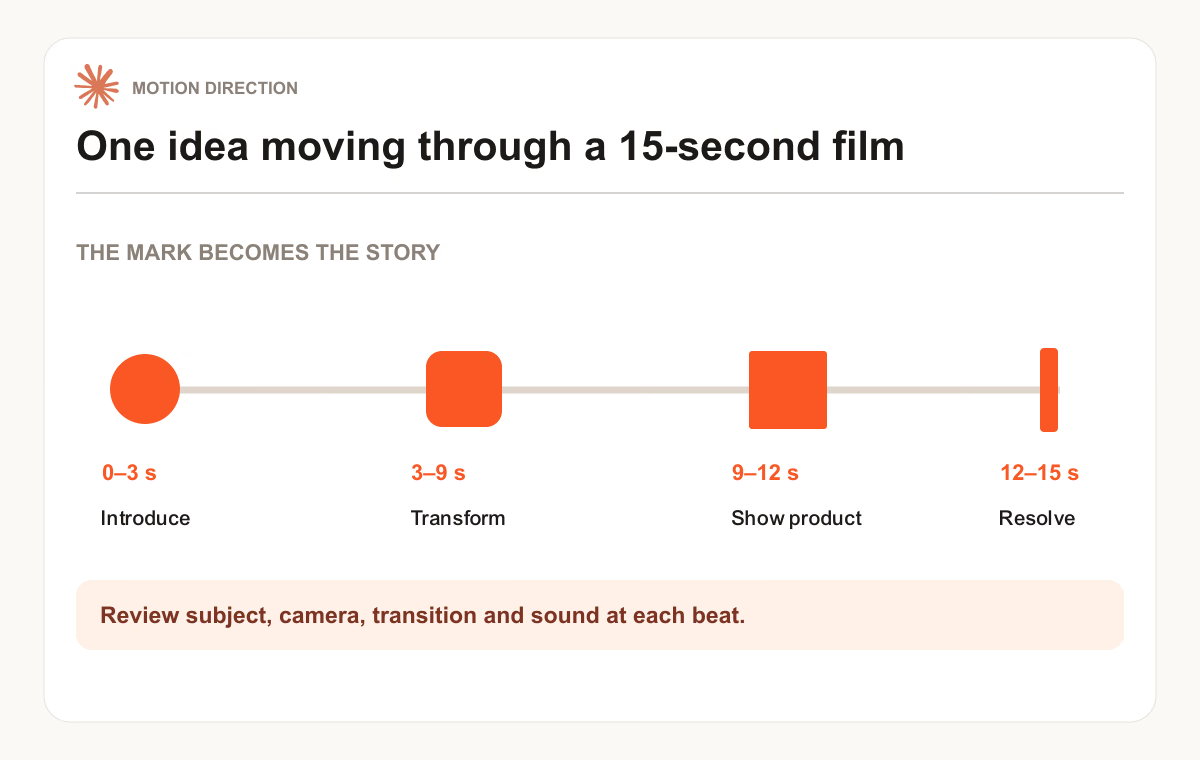
At 15 seconds, every second carries work. One possible brief might reserve 0–3 seconds for the problem, 3–9 for the organizing motion, 9–12 for a product moment, and 12–15 for the identity and final sound cue. Those durations are an example, not a template for every brand. A quiet product reveal may need longer holds; a music-led cut may change on a syncopated beat.
Write each beat as subject, action, camera, transition, sound. “The orange line threads between floating files while the camera follows it” is buildable. “Feature two: save time” is a slide label. Carry one visual motif across shots so the sequence feels like one piece of motion design rather than disconnected cards.
Before implementation, draw three key frames: opening, the moment of greatest transformation, and final frame. At thumbnail size, each should show a clear subject. Ask Claude to render a short motion test between two frames. Review the test for ease, speed, continuity, and text readability before rendering the whole film.
Give Claude a brief it can execute
“Create a 15-second 16:9 motion film for Thrive. Use the supplied logo and product screenshots. The story is scattered AI skills becoming an organized workflow. Build around one orange line that guides the camera through the transformation. Use the attached reference for pace and type restraint, without copying its shots. First provide a timed beat map, three key frames, asset gaps, and a sound plan. After I review the direction, implement and render the film with synchronized audio. Check the opening and final frame at mobile size.”
This prompt states the deliverable and the first review gate. It gives Claude room to choose visual details that fit the assets. If the reference suggests a different motion language, the brief can change without forcing every project into the same look.
The Motion Direction Brief skill helps shape the first pass. The free Animation & 3D Motion Design skill covers related animation work, and Thrive's AI Video workflow takes a rendered product film from references through review. For the prompt side of video work, see AI video prompts.
Inspect the film, not just the frames
Export the intended aspect ratio and review the video with sound. Check that movement continues through transitions, brand elements are accurate, text can be read during its actual on-screen time, and music does not hide an important cue. Watch the first three seconds without pausing. If the concept only becomes clear when you read the storyboard, revise the opening action.
Common questions
Will a motion skill make Claude render a video by itself?
The skill gives Claude a workflow. Rendering still requires an available animation toolchain, source assets, and an export step. Ask for the target format and a sample render early so you can find missing fonts, media, or audio before the final pass.
Should I upload a reference video?
Yes, when you have one. Point to the moments that matter: perhaps a restrained opening, a camera handoff, or a cut that lands with the music. Ask Claude to describe those principles and design new shots for your product. A reference without that explanation can pull the result toward imitation or the wrong visual taste.
Put it into practice
Your next step
Have a question or a correction?
Contact Thrive