
The short version
- Start with one slash command and the smallest required permissions.
- A passing code test is not a substitute for checking the command in Discord.
A Discord bot skill for Claude should guide the agent through one working bot feature: define the command, create the Discord application, request the smallest necessary permissions, keep its token secret, and test in a server you control. A folder of generic bot snippets is less useful than a checklist that makes Claude verify the command in Discord.
Start with one command and its permissions
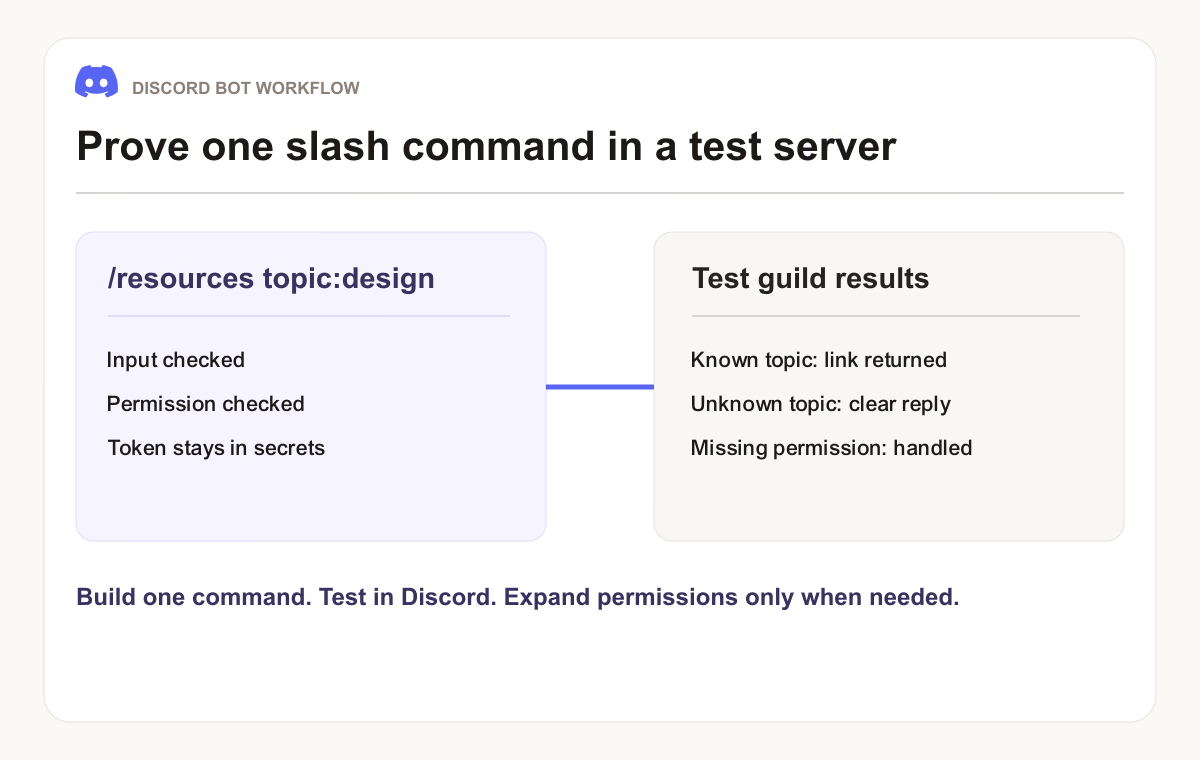
Imagine a community wants /resources topic:design to return a curated link. Write down who may call it, where it should respond, whether the reply can be public, and where the links live. This is enough to build and test a vertical slice. A request like “make a community bot” leaves permissions, data handling, and success criteria unresolved.
Discord's quick start explains the application, bot user, credentials, and installation flow. Use the current guide when configuring the app because portal settings and permission labels can change. The application commands documentation covers slash command structure and interaction handling.
Decision | For the | Why it matters |
|---|---|---|
Command |
| A testable behavior instead of a vague feature list |
Installation | Test guild first | Changes can be checked without affecting every server |
Permissions | Only those required to send the response | Fewer ways for a bug to affect the server |
Data | Curated links, no user profiling | Avoids collecting content the command does not need |
Failure | Helpful ephemeral error for unknown topic | Users know what to try next |
Install a workflow, then build in the project
Claude Code can load instructions from a skill as described in its skills documentation. Install the Discord Bot Builder skill for the brief, permission review, and testing checklist. Give Claude the existing project files and hosting target. The skill should adapt to the project's language and framework rather than replacing them on principle.
Keep the bot token in an environment variable or secret store. Never paste it into chat, a source file, or a browser bundle. If a token was exposed, rotate it in the Discord Developer Portal and update the deployment secret. Ask Claude to show an .env.example with variable names only.
For a command-based bot, consider application commands before reading every message in a server. Request a privileged intent only when the feature needs it and your application is configured for it. Give the bot the smallest installation scopes and permissions that support its actual behavior.
Make Claude prove the first slice
A useful build prompt is: “In this Node project, implement one Discord slash command, /resources topic, using the existing stack. Return one curated link for design and a clear response for unknown topics. Use environment variables for credentials, ask for only the scopes and permissions this command needs, register it in my test guild, and add tests for valid input and missing configuration. Show the exact manual guild checks before calling it complete.”
Claude can write the files and tests, but a passing unit test does not prove that the command is registered, installed, and responding in Discord. Test with a guild you control. Call the command as an authorized user, with an unknown topic, and where the bot lacks a permission. Record the observed result and fix the configuration or code that fails.
Deploy without losing control of the bot
Put credentials in the host's secret settings and set a restart procedure. Log command names, error categories, and useful request identifiers; avoid logging tokens and private message content. Document how to disable the bot, rotate its token, and update registered commands. If the bot stores user data, state what it stores, why, and for how long.
The first deployment is complete when the command works in the intended server and the team can repeat the setup from written instructions. After that, add features one at a time and revisit permissions whenever a new feature needs broader access.
Common questions
Does a slash-command bot need to read every message?
No. A command such as /resources can respond to its own interaction. If a later feature requires message content or another privileged intent, specify that feature, confirm the current Discord requirement, and update the app configuration deliberately. Do not ask for broad access as a shortcut.
What should I give Claude before it starts?
Provide the existing repository, runtime, one command specification, test guild, hosting target, and the permissions you are willing to grant. Give it variable names for credentials, not token values. Ask it to report what it tested in code and what still needs a manual check in Discord.
Put it into practice
Your next step
Practice
SkillDiscord Bot BuilderHave a question or a correction?
Contact Thrive